Thumbnail and header credit: Tatiana
Your technical skills and portfolio are of upmost importance as a freelancer – but small improvements to your workflow and communication methods can lead to amazing developments in your CGI career.
Let’s look at some common barriers to success in the freelance CGI sector.
Software
Gmail
A professional email address, profile picture and username are paramount to your freelancer status. Although we get a good chuckle when sending style bibles to epicvalorantgamer12@gmail.com, think like a professional and use your forename and surname, with simple variations if your chosen name is unavailable. We recommend against complicating your email address further; keep it simple.
Discord
Many indie studios will exclusively use a Discord channel for communication, both with their team and with freelancers. We recommend making a separate Discord profile, with a clear username and profile picture to avoid any confusion. In your “About Me” section, include a small bio and a link to your portfolio and any relevant social media profiles.
However, make sure you sign out of your work account outside of your dedicated hours. Discord’s activity tab shares your current in-game status to everyone on your friends list – don’t get caught playing Skyrim instead of UV unwrapping!
Even we use Discord! Join the CGHero Discord.
Slack
Instant messaging and calling application Slack is an a handy account to have. . This can be a handy account to have, as those outside of games (specifically those in outsourcing, film, TV or VFX) typically stray away from Discord. Slack is more formal, but works in a similar format. Although not as mainstream for CGI, it’s worth familiarising yourself with the app and making an account.
Jira (or other project management tool)
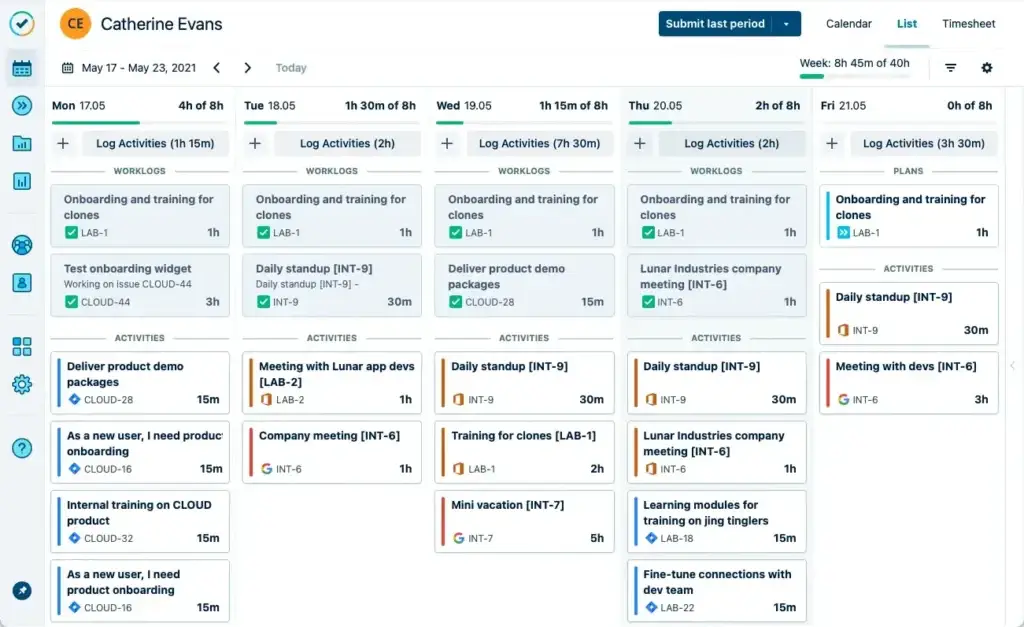
This fantastic tool is designed for project management, and is used across the CG industry for time management and progress tracking. Useful nearly every regard, Jira uses intuitive features to clearly display an artists’ progress, and is especially useful in QA and development when it comes to adding features or fixing bugs.
It may be beneficial to familiarise yourself with Jira if you aren’t already, or get used to a free equivalent such as Trello. Even if you don’t currently use a project tracking tool, consider implementing one into your workflow to optimise your time and priorities.
Soft Skills
Adaptability
Be open minded; on occasion, you’ll be asked to step outside your comfort zone and tackle a new problem. This could be re-arranging your UV shells into atlases, or use a new software to convert a file format. We love working with people who are happy to pick up new skills and adapt to new skillsets; it saves us time searching for a freelancer for a small job, and lets you earn a little more, too. With more additional skills in your expertise, the more you can offer to prospective clients and increase your customer base.
Skills to consider:
- 3D Artist: Optimisation, file conversions in .3ds, .obj, .fbx and .blend formats, rendering in Corona, Eevee or Arnold
- 3D Animator: Cloth simulation, Unreal Engine/Unity animation importing knowledge,
- 3D Character Artist: Clothing/Marvellous Designer knowledge, rendering, xGen hair grooming
Time Management
We can’t stress this one enough. We manage a lot of freelancers, and time management is one of the core issues. It’s completely understandable; you overestimated a task, or life got in the way. In any case, be upfront about any issues to your client, don’t leave them in the dark.
To prevent unhealthy or unsustainable schedules, implement a few basic rules. Set your own working hours around your workload; many find it useful to mimic a 9 to 5.
Most importantly, set boundaries and don’t overload yourself with projects! Use a project management tool (like Jira) to track your availability and give yourself days off. Not taking time to socialise, game, pursue your own hobbies and get enough sleep will negatively impact your productivity.
Communication
Be clear and concise in your messages and emails to clients. As we mentioned above, if you’re struggling to meet a deadline, or if you don’t understand a requirement, be upfront about your situation. More often than not, a solution can be figured out
Reply to messages quickly within your working hours; simple clarifications or software enquiries should be quickly resolved, and you should be on-hand to clarify anything a client might need after a hand in.
Languages
We recommend using English for your international clients. As the lingua franca of the internet, you’ll find the majority of CGHero clients mostly come from English speaking countries, such as the US, UK, Australia and Canada.
In Brazil, a thriving CG industry is rapidly growing; however, whilst Portuguese is on the rise, we recommend brushing up on your English skills for invoices, meetings and calls with typically monolingual Anglophones.
Presentation
In many cases, milestone assets will simply be submitted by sending the file to the client. However, you could be asked to present your work for a final submission ready for display or promotion. This is a good skill to have, and as an artist you are likely already familiar with basic visual design skills.
Check out our article on how to present an environment art piece, which is also applicable to props and character art.
In demand skillsets
Some technical skills are useful across the board. Consider picking up the following:
- Lighting knowledge, ideally in Unity or Unreal
- Familiarity with tools and plugins for selected software – ie, SimplyGon for Maya
- Photoshop/graphic design skills for presenting portfolio pieces.
- Basic video editing skills – useful for presenting environment art projects, level design and game design mechanics and playthroughs.
- HTML for modifying your portfolio website
- Google Suite familiarity – namely Slides, Docs and Excel.
- Optional: Social Media. This is a great place to promote yourself without relying on word of mouth. Twitter and LinkedIn are the best places to share your work and reach prospective clients.
Skillsets can vary in value per freelancer. Check out our guide to see what you could be making as a freelancer in your field.
Equipment
Aside from your PC setup, you may need some extra equipment for ease of communication.
- HQ Microphone: essential for Discord, Slack, Zoom and other means of virtual meetings. A bad microphone can be detrimental to communicating your skillset and ideas on a project.
- Webcam, if you’re comfortable with it. This is a great way of getting to know your clients more, and vice versa; in a digital industry, virtual meetings are the primary form of discussion for remote freelancers.
Interested in expanding your client base? We’d love to work with you. Work on exciting new projects and join an amazing community of artists on CGHero.